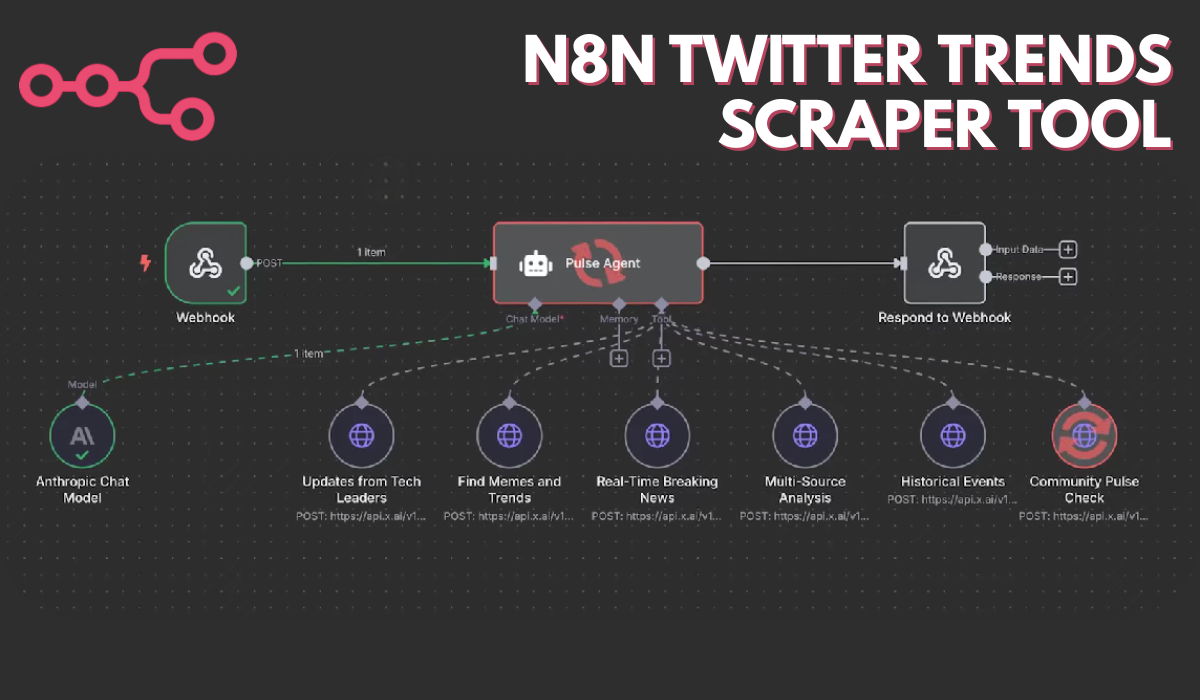
Unlock instant insights from X (Twitter) with this powerful real-time analytics automation built for n8n. Easily analyze tech leaders’ opinions, track breaking news, summarize trending memes, and provide multi-source research using a single no-code workflow. You can import the JSON template included and connect it to your own processes for actionable X intelligence in seconds.
How to Make Twitter Trends Scraper with n8n: Step-by-Step Setup
Step 1: Log Into n8n
Sign into your n8n dashboard. Click “Workflows” and use the “Import” button to upload your downloaded JSON file.
Download JSON n8n Automation File: Click Here
Step 2: Add and Configure the Webhook Node
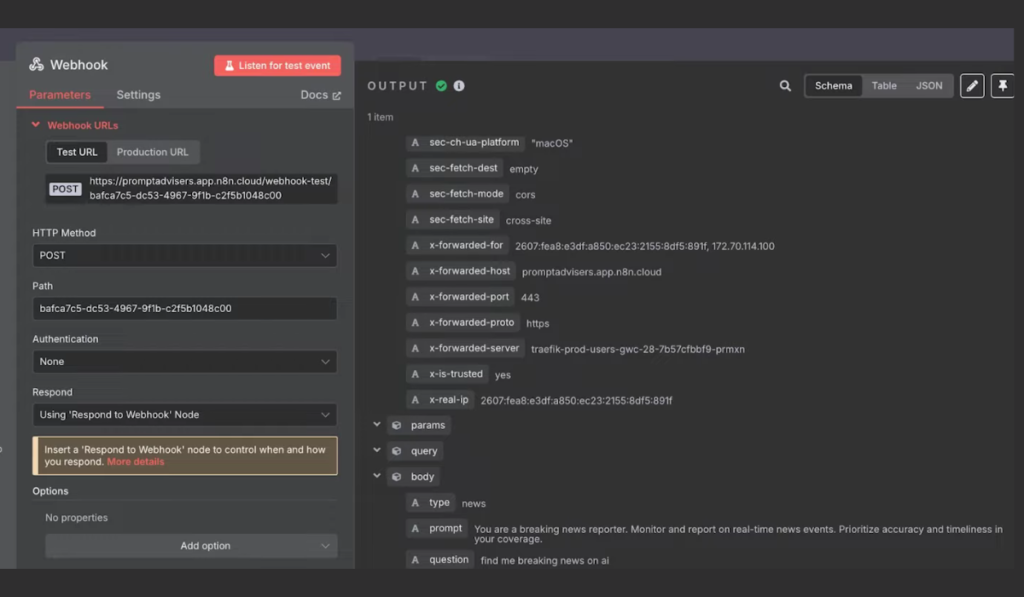
Start your workflow with a Webhook node. This node listens for questions or topics — either from a website, chatbot, or internal app — and triggers real-time analytics whenever data arrives.
Step 3: Pulse Agent Node — The Brain of the Workflow
The Webhook connects to a Pulse Agent (advanced prompt engineering inside an “Agent” node). This agent analyzes the user’s request and attached metadata to decide what kind of insight to fetch.
- If the request is about tech leaders, it routes to the appropriate data source.
- If the request is for memes/trends, breaking news, or historical events, the agent dynamically switches tools and provides structured instructions.
Step 4: Specialized Analysis Nodes
There are six key analytics options, each as a separate HTTP Request node:
- Updates from Tech Leaders: Analyzes posts from big-name accounts (Musk, Brockman, LeCun, Hassabis, etc.)
- Find Memes and Trends: Scans for viral memes and trending content.
- Real-Time Breaking News: Tracks news and major developments as they happen.
- Multi-Source Analysis: Combines info from X, mainstream web, and selected news.
- Historical Events: Looks back at past discussions for timeline/sentiment tracking.
- Community Pulse Check: Focuses on technical insights and debates within tech/AI communities.
Each node sends your query and routing preference to the X Grok API, which provides structured, citation-backed summaries.
Step 5: Get Results & Return to User
After processing, the workflow collects the answer (with verified X links/citations) and uses a Respond to Webhook node to send a plain-English, reference-rich result back to the user or app.
ALSO READ:
FAQs
What does this X Analytics Workflow actually do?
It instantly searches X (Twitter) for tech leader opinions, current events, trends, or historic sentiment, returning detailed answers with source links.
What API keys do I need?
You need an X Grok API key (provided by x.ai) and a free n8n account to run this workflow.
Can I track only specific accounts or hashtags?
Yes, you can customize the tracked handles or keywords in each analytic node’s settings for specific verticals or influencer lists.
How fast does it give answers?
Usually, the results are delivered in seconds or less, depending on API speed.
Can I connect it to my website or chatbot?
Yes, simply forward user questions or events to the Webhook endpoint — answers will come back ready to display.
Is this template free to use and modify?
Absolutely — just import, connect your credentials, and tweak nodes to suit any analytics task.